

Users & permissions
What a person can see and do in Behaview is determined by all the permissions assigned to them. Permissions add up: a person always has the broadest access that any of their assignments grants, so you grant capability by assigning more, never by working around restrictions.
Predefined permission sets
Section titled “Predefined permission sets”For convenience, Behaview ships predefined permission sets that cover the common cases: assign one and you’re done. You pick a set on a role’s Permissions tab, and every member of the role gets it. Only an Admin, or someone whose custom permissions give them full access to Roles, can change it; anyone else who can edit the role sees the tab read-only:
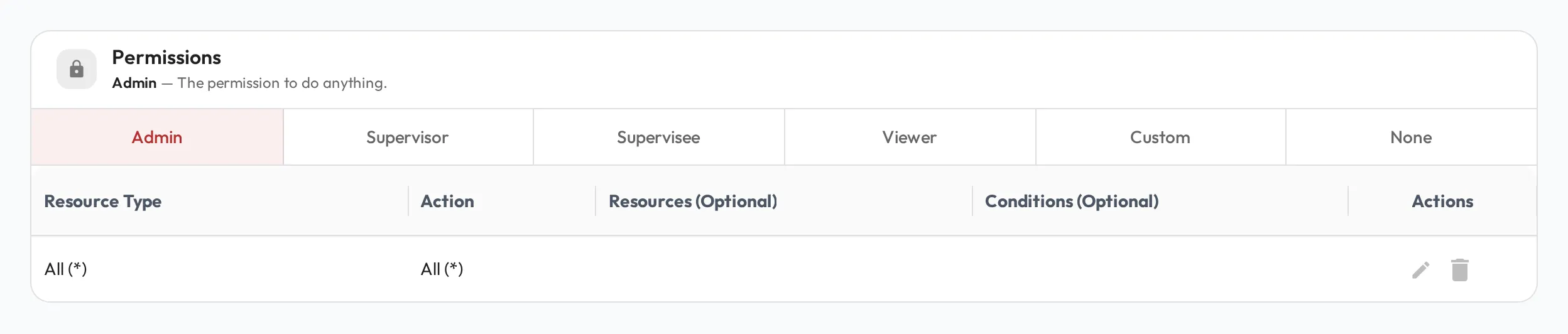
Each suits a different kind of person:
- Admin: full access to everything, from the organization’s settings to every person’s data. For the people who own setup and run the account: clinic owners, clinical directors, operations leads.
- Supervisor: manages Skills and Collections, and plans, runs and records Session Plans for the people they are a Supervisor of. It cannot change Organization settings, Roles or Teams. For BCBAs and BCaBAs who supervise RBTs and trainees.
- Supervisee: focused on their own development: their own Session Plans and skill scores, plus read access to Skills, Collections and Roles. For RBTs, Behavior Technicians and trainees accruing fieldwork hours.
- Viewer: sees their own profile and Session Plans, the skills and playbook pages assigned to their roles or to no one, and the profiles, Session Plans and skill scores of the people they are set as a Viewer of in Relationships. They can also run the Session Plans where they are the Observer. For someone who follows particular people’s progress without supervising them, such as a Guardian/Parent following their child, an external supervisor, or a clinical director.
Admins, Supervisors and Supervisees see everyone in the organization when choosing a person, though some pickers, such as the Observee picker, list only the people whose Session Plans you can see. A Viewer, or someone whose custom permissions cover only some people, sees only themselves and the people they have access to, and may also see by name someone they share a relationship with.
Custom permissions
Section titled “Custom permissions”When the predefined sets don’t fit a special scenario, give a role Custom permissions, a tailored combination you set resource by resource. Because permissions add up, adding someone to a Custom role extends whatever their other roles give them, without starting from scratch.
Organization ownership
Section titled “Organization ownership”One person is the organization owner, the final authority on the account. The owner has every admin permission, and their profile shows an Organization Owner shield. To transfer ownership to someone else, email us at support@behaviewhq.com.