

BACB Ongoing Supervision Report
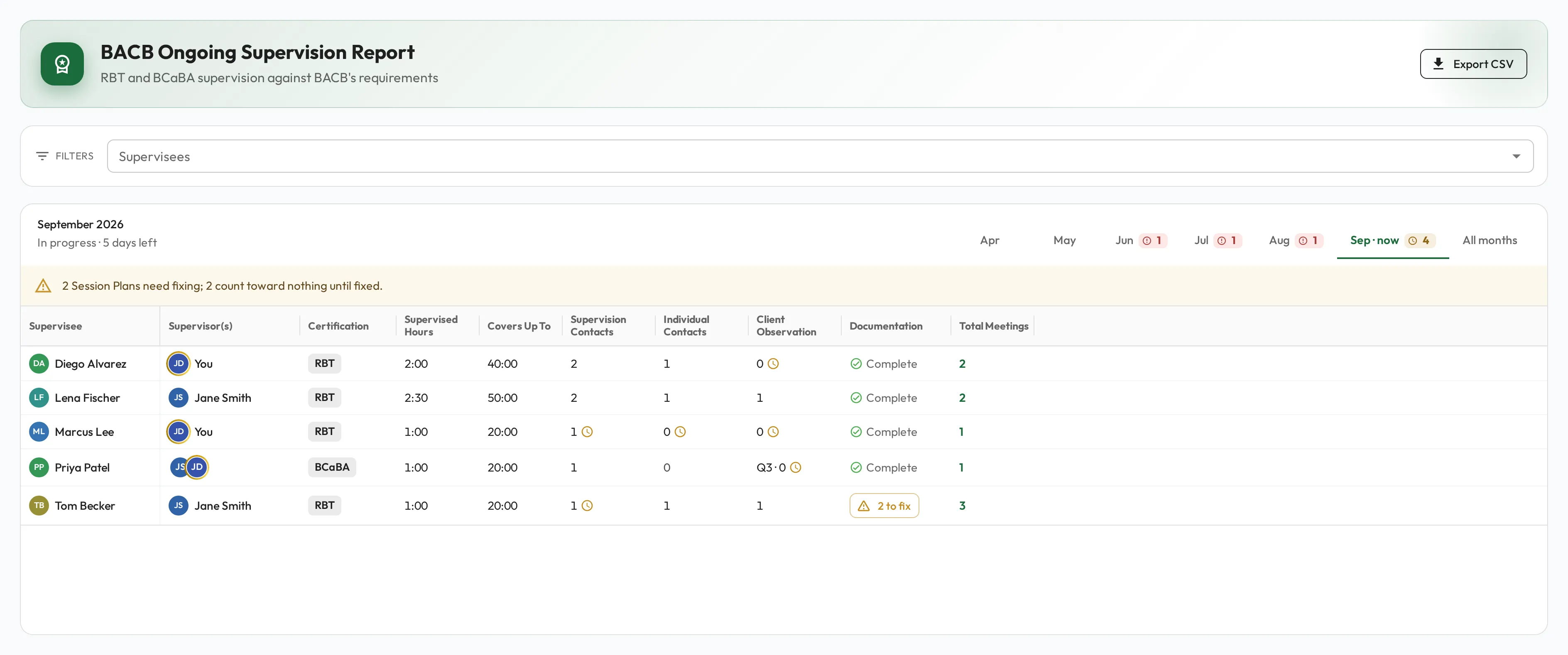
The BACB Ongoing Supervision Report checks each certified RBT’s and BCaBA’s months against BACB’s ongoing-supervision requirements for their certification. Open Reports and, under ABA & BACB Reports, select BACB Ongoing Supervision.
Who is on it
Section titled “Who is on it”The report reads each person’s certification from Qualification on their profile, and checks every month, past ones included, against its current value. See Certification fields.
| Qualification | On the report |
|---|---|
| RBT or BCaBA | Checked against that certification’s requirements. |
| BCBA/BCBA-D | Left out: BCBAs owe no ongoing supervision. |
| Blank | Left out, whatever Pursuing BACB Certification says: someone with no certification has none to maintain. The BACB Fieldwork Report checks a trainee’s fieldwork instead. |
A person joins the report with their first BACB Session Plan that is Done, or has ended without being marked Done. From then on every month has a row, through the current month, so a month without supervision shows as short.
Requirements
Section titled “Requirements”| Requirement | RBT | BCaBA |
|---|---|---|
| Supervision contacts: Individual or Group Session Plans | at least 2 a month | at least 1 a month |
| Individual contacts: with the supervisee alone | at least 1 a month | Not required |
| Observation with a client | at least 1 a month, in a supervision contact | at least 1 a quarter, in any Session Plan |
| Supervised hours | at least 5% of the hours they provide services | at least 5% of the hours they provide services |
A Recorded Video review is never a supervision contact and adds no supervised hours. For a BCaBA, it counts toward the quarter’s observation, and so does an Independent session in which the supervisor watched without giving feedback, with Client Observed ticked or Observation Minutes filled in.
Service hours are mostly recorded outside Behaview, so the 5% check can only use what is logged here: the supervisee’s hours with a Supervision Type of Independent. It is marked short, or to go while the month is open, only when those hours already need more supervision than the month had. Covers Up To shows the most service hours the month’s supervision covers: 2 supervised hours cover up to 40 hours of services.
Months
Section titled “Months”The tabs are the six months ending this month, the current one marked now, then All months. The current month reads In progress with the days left, and earlier months read Closed. Under All months, each row is one supervisee and month, with a Month column.
A symbol beside a value marks a gap: a clock for To go while the month is open, a red exclamation mark for Short once it has closed. A BCaBA’s observation stays To go until the quarter closes. Hover over or tap the symbol to see the gap and what the requirement needs. In a month with no hours logged, it adds that the requirement does not apply if they provided no services that month.
Columns
Section titled “Columns”| Column | Shows |
|---|---|
| Supervisee | The person, linked to their profile. |
| Month | Under All months only. |
| Supervisor(s) | Everyone who is the Supervisor on the month’s Session Plans. |
| Certification | RBT or BCaBA, from Qualification. |
| Supervised Hours | Individual and Group supervision, in hours and minutes. |
| Covers Up To | The most service hours the month’s supervision covers at 5%. |
| Supervision Contacts | Individual and Group Session Plans, except Recorded Video reviews. |
| Individual Contacts | Supervision contacts with the supervisee alone. For a BCaBA it is greyed out: Not required for a BCaBA. |
| Client Observation | Supervision contacts in which the supervisor observed the supervisee with a client. For a BCaBA it is the quarter’s count, recordings and watching without feedback included, such as Q3 · 1. |
| Documentation | Complete, or a button with how many Session Plans to fix. Empty in a month with no Session Plans. |
| Total Meetings | How many Session Plans the month holds. Select the number to open them in the Session Plans list. |
On a phone, Supervisor(s), Certification and Supervised Hours are hidden.
Session Plans to fix
Section titled “Session Plans to fix”Documentation lists only the Session Plans that Count toward nothing: ended without being marked Done, no start or end time, no Supervision Type, or a Recorded Video review with no observation recorded. Unlike the fieldwork report, this report does not need an Activity Category and does not flag missing details. Fix them as in Documentation and Session Plans to fix.
Supervisees and Export CSV
Section titled “Supervisees and Export CSV”Supervisees narrows the report to the people you pick. It offers only people the report checks, and shows only when there is more than one to offer.
Export CSV downloads every row for those supervisees, whatever month tab is open, as BACB Ongoing Supervision Report. The file also has the Month and each supervisor’s Qualification and Certification ID, and writes a gap beside its value, such as 1 (short 1).
Who can see it
Section titled “Who can see it”As for the BACB Fieldwork Report: see Who can see it.