

Progress Feed
The Progress Feed answers one question: is supervision actually moving? A dashboard shows the numbers you chose to track. The Progress Feed shows the supervision itself, in one screen, for every active person you can see: how much activity there has been, who is taking part, and what changed for whom.
Find it under Reports, in the Coaching Reports section.
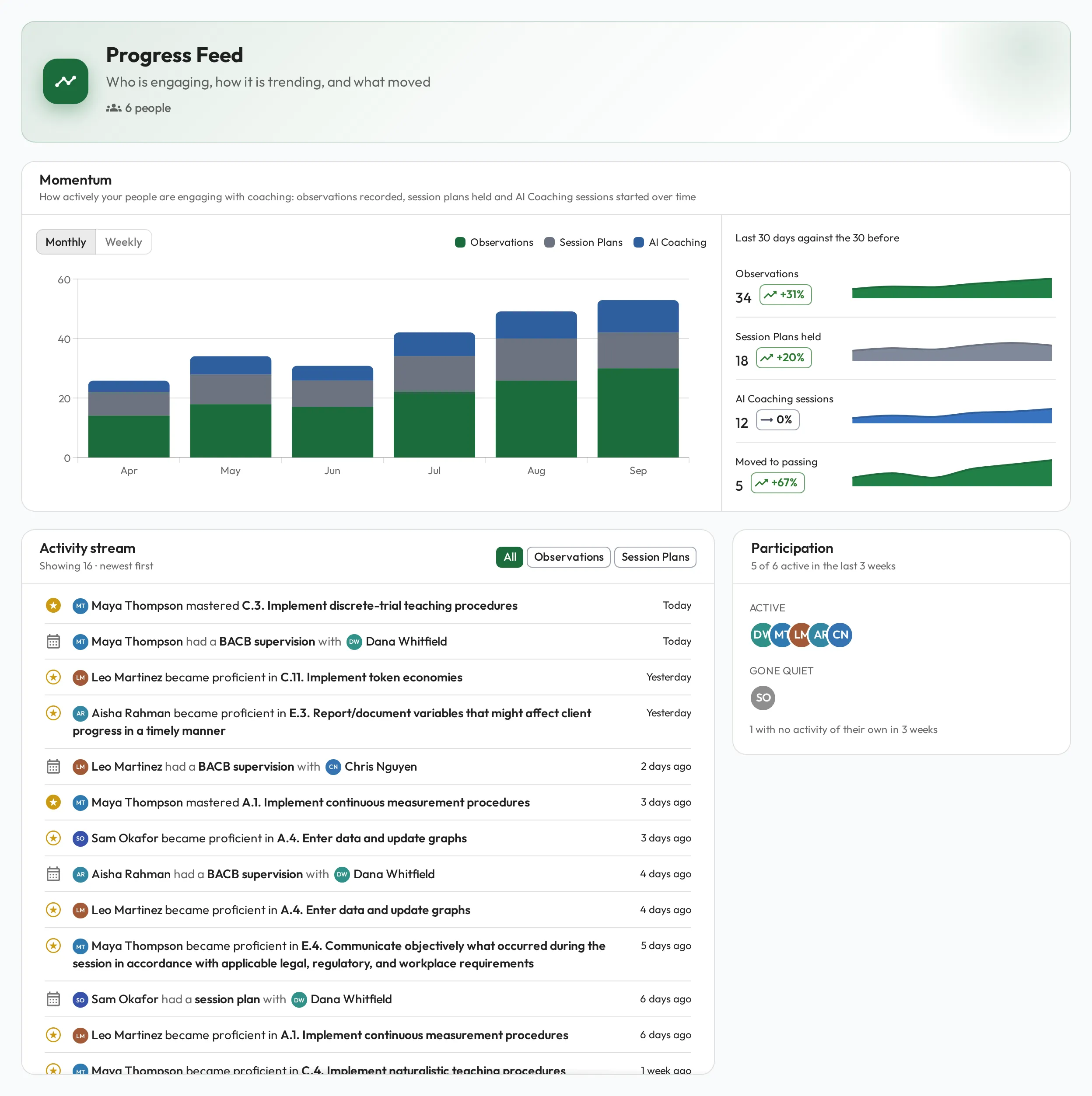
Momentum
Section titled “Momentum”The bars count activity per week or per month: observations recorded, Session Plans held, and AI Coaching sessions started. Switch between Monthly (the last 6 months, the default) and Weekly (the last 8 weeks).
The rows beside the chart follow the same setting: Monthly compares the last 30 days against the 30 before, Weekly the last 7 days against the 7 before. The small line in each row has one point per bar in the chart:
| Row | What it counts |
|---|---|
| Observations | Every completed observation, including self-assessments and AI-graded practice |
| Session Plans held | Session Plans marked done, on or before today |
| AI Coaching sessions | Every AI Coaching session started, counted once, on the day it started |
| Moved to passing | Every time a score someone else recorded, and that counts toward mastery, takes a skill from below its mastery threshold to at or above it, a first-ever passing score included. Self-assessments do not count toward it |
Anything dated in the future waits until its date passes before it counts.
Activity stream
Section titled “Activity stream”The stream is the milestones, newest first. Each entry names the person and what happened:
- became proficient in a skill, when a score completes the required number of sessions in a row at its threshold. It appears again if a score below the threshold breaks the streak and they build a new one. Marked with a gold medallion
- mastered a skill, a perfect 100 that completes or continues that run. When one score does both, the entry reads mastered. Assumed proficiency does not count toward it. Marked with a solid gold medallion. Another 100 straight after does not repeat it
- had a Session Plan, named by its type (for example “had a BACB supervision”), with the person who ran it (left out when they ran it themselves, as in a self-assessment). Click it to open the Session Plan
Other scores, such as one that goes up without completing the run, are not entries. They still count in Momentum, and in Participation for whoever recorded them.
Click a skill to open it in a new browser tab so your place in the stream stays put. If you installed the app on your device, it opens in the same window instead.
Only scores that someone else recorded, and that count toward mastery, produce entries. Self-assessments, AI-graded practice and AI Coaching sessions count as activity in Momentum and Participation, but they never appear in the stream. A Self-assessment Session Plan still appears as a Session Plan entry.
Filter with All, Observations or Session Plans. Scroll to load older entries; the stream ends with “You’re all caught up”.
Participation
Section titled “Participation”Participation sorts people by what they did themselves in the last three weeks, so an RBT does not count as taking part just because their supervisor is busy. Any of these counts:
- Recorded an observation, including a self-assessment
- Had a Session Plan marked done as its Observer, or signed one off
- Planned a Session Plan, or changed its details, Agenda or Observation Notes
- Saved Personal Notes on a Session Plan
- Practiced in AI Coaching
- Wrote or updated a note on someone’s profile, including a task, commitment or win
- Answered a question set
- Commented on a file
- Created or edited a playbook page
| Group | Who is in it |
|---|---|
| Active | Anyone who did one of those things |
| Gone quiet | Everyone else, including people who were only observed or supervised by someone else, and people who have never been observed at all |
Hover a face for the name, or click through to their profile.
This is the card to read first when momentum looks healthy: a rising bar chart can still be four BCBAs doing all the work.
On a new organization, before anyone has been observed, the stream reads “Nothing has moved yet.” and Participation lists people under Gone quiet. That is the empty state, not a fault.
What you see
Section titled “What you see”The Progress Feed covers every active person you have permission to see. Deactivated people are left out, so they never show up as gone quiet, though one can still be named as the Observer on a Session Plan entry.
It respects the same visibility rules as the rest of the app. A score from a Session Plan that is not shared with its Observee makes no entry in the stream and does not count toward Moved to passing, for anyone. It still counts as activity in Momentum, except in the Observee’s own view. Draft observations never appear for anyone. AI Coaching conversations stay private to the person who had them; the feed only counts how many were started.
Of the predefined permission sets, only Admin opens the report. Custom permissions that can read all observations and Session Plans can open it too.