

Ongoing supervision for RBTs and BCaBAs
Certified RBTs and BCaBAs need ongoing supervision every month to keep their certification. Behaview records each supervision as a Session Plan, and the BACB Ongoing Supervision Report checks each person’s month against BACB’s requirements, so you see who is short before the month closes rather than after.
What the report checks
Section titled “What the report checks”The report reads each person’s certification from their Qualification field and checks only RBT and BCaBA. Anyone else is left out, a blank Qualification included, whatever Pursuing BACB Certification says.
| Requirement | RBT | BCaBA |
|---|---|---|
| Supervision contacts (Individual or Group) | 2 a month | 1 a month |
| Individual contacts | 1 a month | Not required |
| Observation with a Client | 1 a month, live | 1 a quarter, live, from a recorded video, or watched without feedback |
| Supervised share | 5% of the service hours logged in Behaview | 5% of the service hours logged in Behaview |
Service hours are usually recorded outside Behaview, so the supervised share is only marked short when the independent time logged in Behaview already needs more supervision than was given. Covers Up To shows how many service hours the month’s supervision covers. For every column and status, see BACB Ongoing Supervision Report.
Plan the month
Section titled “Plan the month”-
Set the Qualification. On each person’s profile, set Qualification to RBT or BCaBA, and add their Certification ID. See Certification fields.
-
Connect each RBT to a supervisor. A Supervisor relationship puts the RBT in the supervisor’s My Direct Team, one click from a session.
-
Schedule the contacts. For an RBT, plan at least two BACB Supervision Session Plans a month, at least one with Supervision Type set to Individual, and observe them with a Client in at least one. A regular schedule keeps the month on track without anyone counting. See Routine 1:1 supervision.
-
Record each session fully. Set Starts and Ends, Supervision Type, Format, and Client Observed or Observation Minutes when you observed, then complete the Session Plan. A Session Plan counts only once it is Done.
Check it during the month
Section titled “Check it during the month”Open Reports and, under ABA & BACB Reports, select BACB Ongoing Supervision. Each row is one person’s month, with their supervisors, certification, Supervised Hours, Covers Up To, Supervision Contacts, Individual Contacts and Client Observation. A requirement still open shows as To go, and one missed in a closed month shows as Short. From a person’s first BACB Session Plan onward, Done or ended, every month gets a row, even one with no supervision, so a missed month is never hidden. To narrow the grid to certain people, pick them under Supervisees, which shows when there is more than one person to offer.
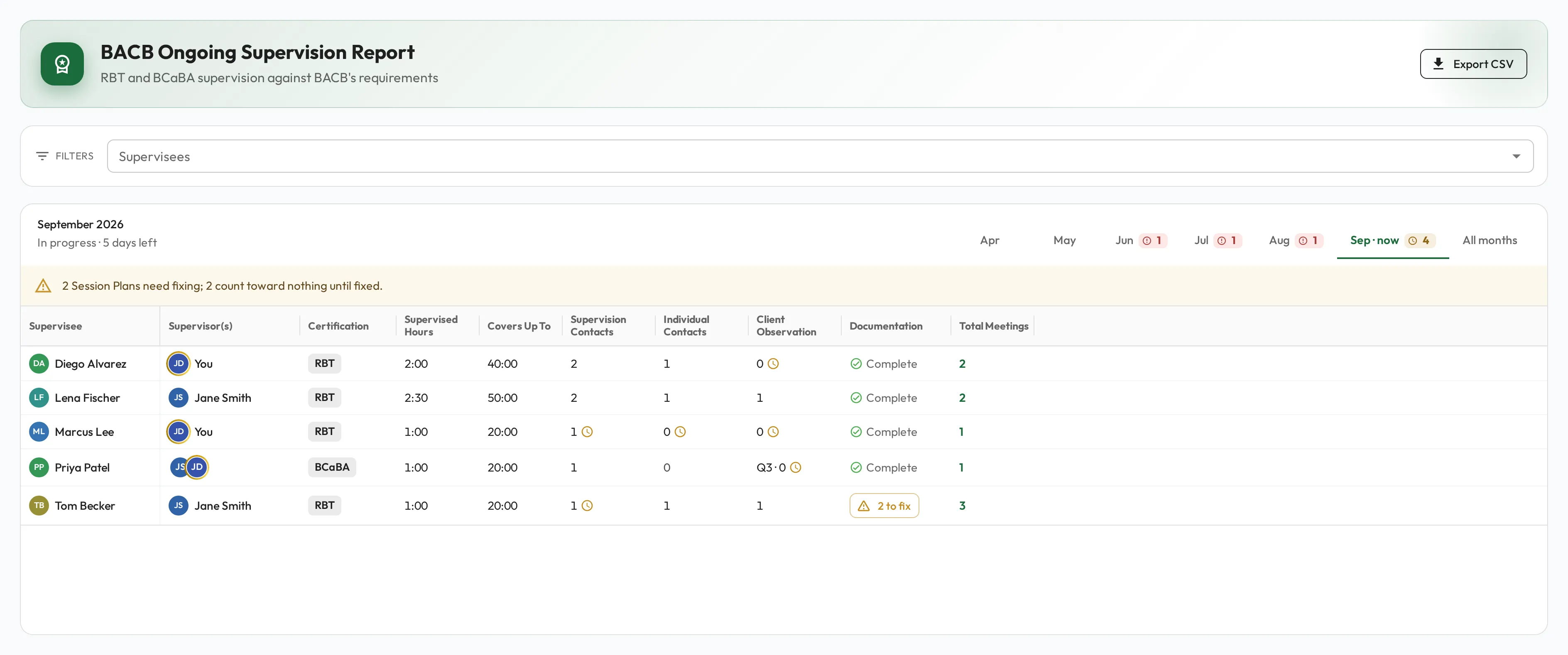
When a Session Plan has ended without being marked Done, or is missing a start or end time, a Supervision Type, or the observation on a recorded review, the person’s Documentation cell shows how many to fix. Open the list, select a Session Plan’s date to open it, then re-open it, fix it and complete it again.