

BACB Fieldwork Report
The BACB Fieldwork Report checks each trainee’s fieldwork against BACB’s 2027 requirements for the certification they are pursuing. Summary shows how far each trainee has come toward BACB’s totals. Monthly breakdown checks one month at a time: what is short in a closed month, what is still to go in the current one, and which Session Plans need fixing before they count.
Open the report
Section titled “Open the report”Open Reports and, under ABA & BACB Reports, select BACB Fieldwork Requirements. On a larger screen, the dashboard’s Quick Actions also has BACB Fieldwork Report, for anyone who sees ABA & BACB Reports.
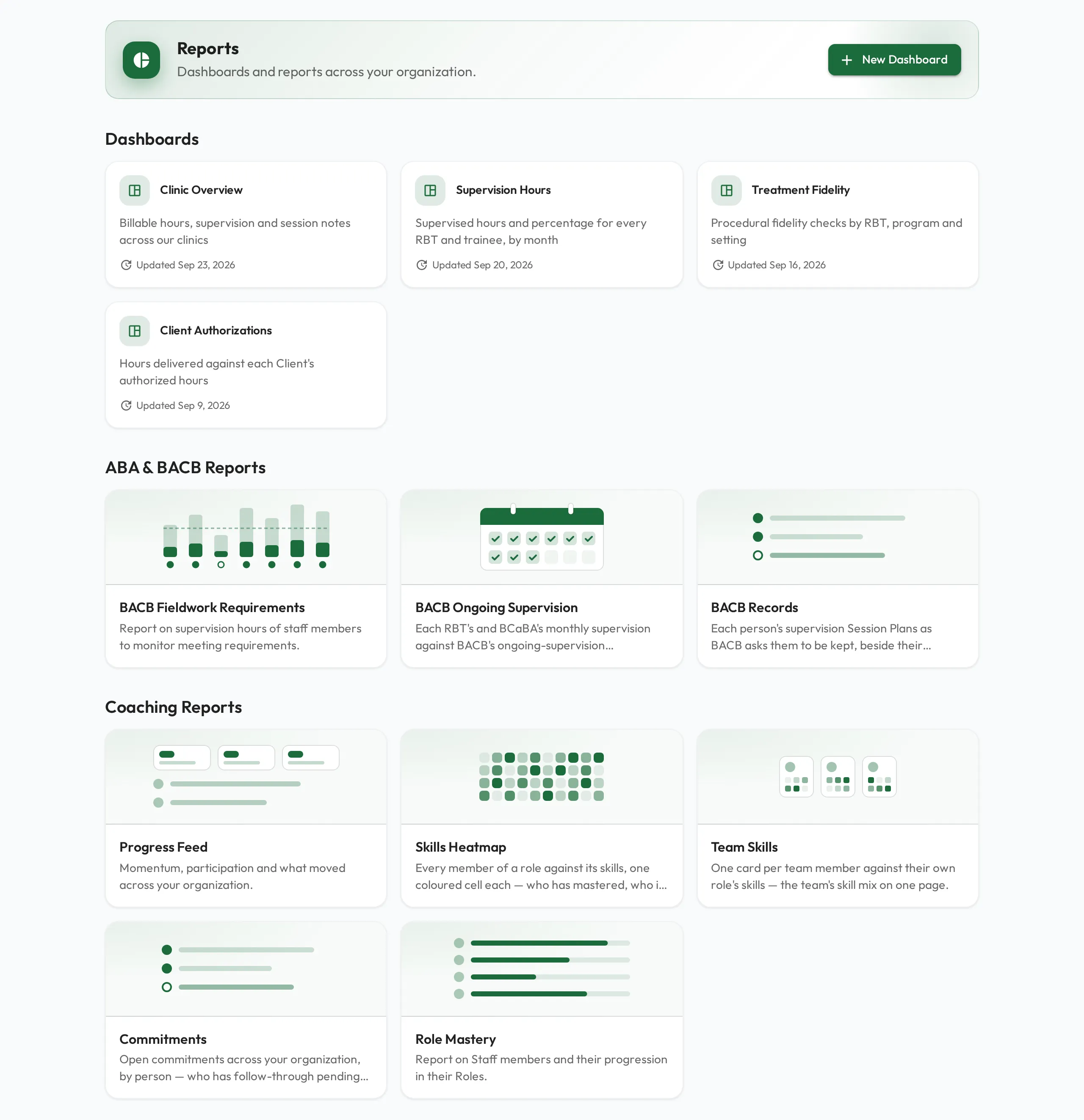
The report opens on Summary. Select Monthly breakdown to see the months.
What it counts
Section titled “What it counts”- Completed Session Plans only. A Session Plan counts once it is Done and is a BACB Supervision or BACB Independent Session, or has a Supervision Type. One that has ended without being marked Done counts toward nothing and is listed to fix. See BACB Session Plans.
- Hours from start and end times. Each Session Plan adds its length, by Supervision Type and Activity Category. A Recorded Video review adds observation only.
- Months by start date.
- Trainees by credential. The Credential column shows BCBA or BCaBA, from the trainee’s Pursuing BACB Certification. A trainee with it blank is not on the report. Every month, past ones included, is checked against the field’s current value, so export the report before you change it. See Certification fields.
Summary
Section titled “Summary”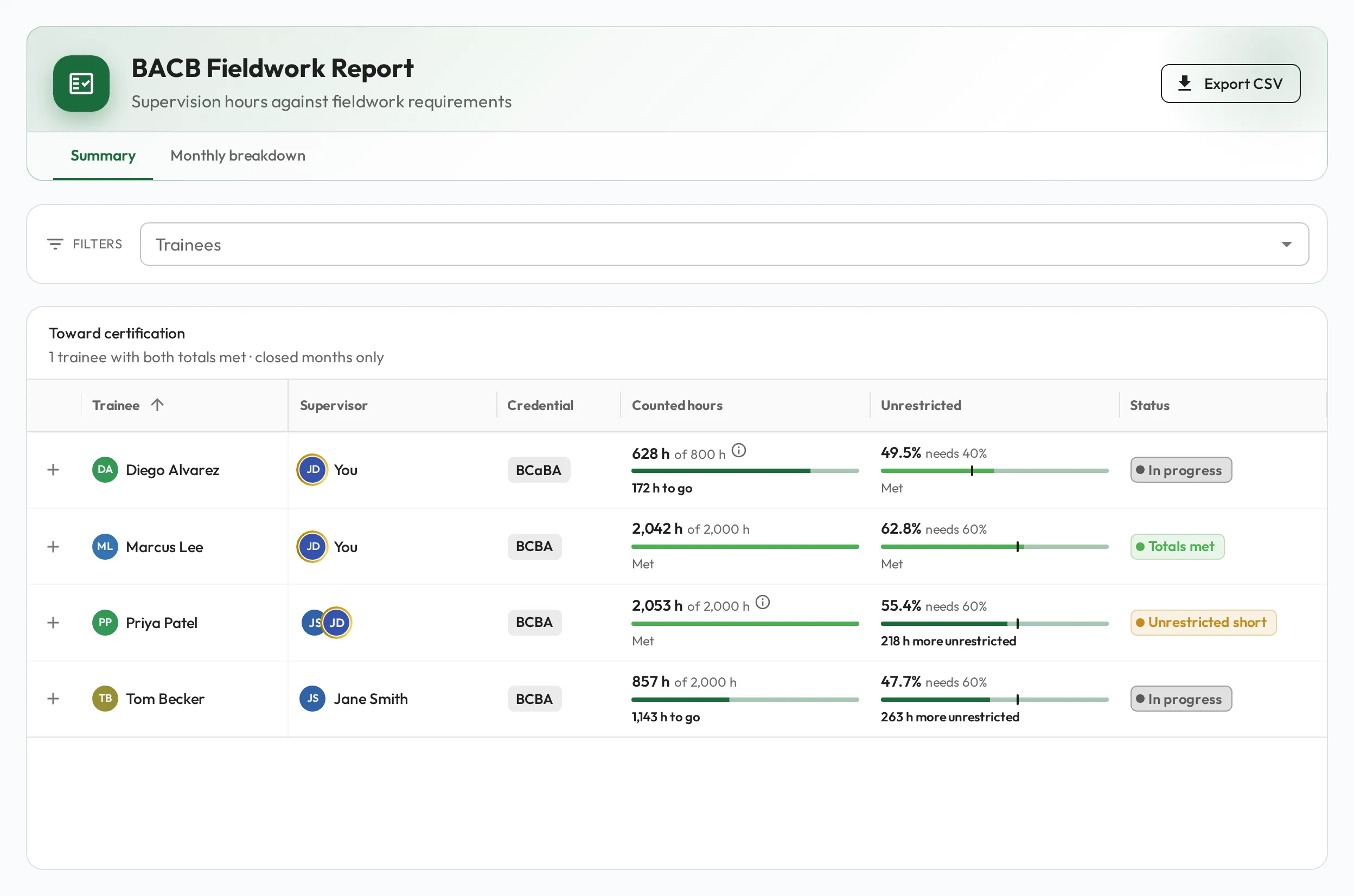
Under Toward certification, each trainee has one row, counting their closed months only. The line under the heading says how many trainees have both totals met.
| Column | Shows |
|---|---|
| Trainee | The trainee, linked to their profile. |
| Supervisor | Who supervised the trainee’s latest month. |
| Credential | BCBA or BCaBA. |
| Counted hours | The hours counted toward the credential’s total, such as 1,716 h of 2,000 h, then the hours to go, such as 284 h to go, or Met. |
| Unrestricted | The unrestricted share of the counted hours against what it needs, such as needs 60%, then how many more unrestricted hours it takes, or Met. |
| Status | Totals met: both totals are met. Unrestricted short: the hours are met but the unrestricted share is not. In progress: the hours are still to go. |
Below a large screen Supervisor is hidden, and on a phone Credential is too.
Select + at the start of a row to see the trainee’s counted hours as the F-FVF’s Fieldwork Hours table records them: independent, supervised, total and % supervised, for supervised and concentrated fieldwork. These are the hours themselves, without the concentrated multiplier.
How the totals are counted
Section titled “How the totals are counted”Each closed month adds what its Counts records on Monthly breakdown, after BACB’s adjustments. The current month adds once it closes.
| Total | BCBA | BCaBA |
|---|---|---|
| Supervised fieldwork hours | 2,000 | 1,300 |
| Concentrated fieldwork hours | 1,500 | 800 |
| Unrestricted share of the counted hours | at least 60% | at least 40% |
| Concentrated multiplier | 1.33 | 1.3 |
A trainee with both fieldwork types is read two ways:
- supervised hours plus concentrated hours × the multiplier, toward the supervised total;
- concentrated hours alone, toward the concentrated total.
The report keeps whichever is further along: the one with the better Status, then the one nearer its total. An information symbol, Both fieldwork types, beside the counted hours says which reading the report kept and why.
Monthly breakdown
Section titled “Monthly breakdown”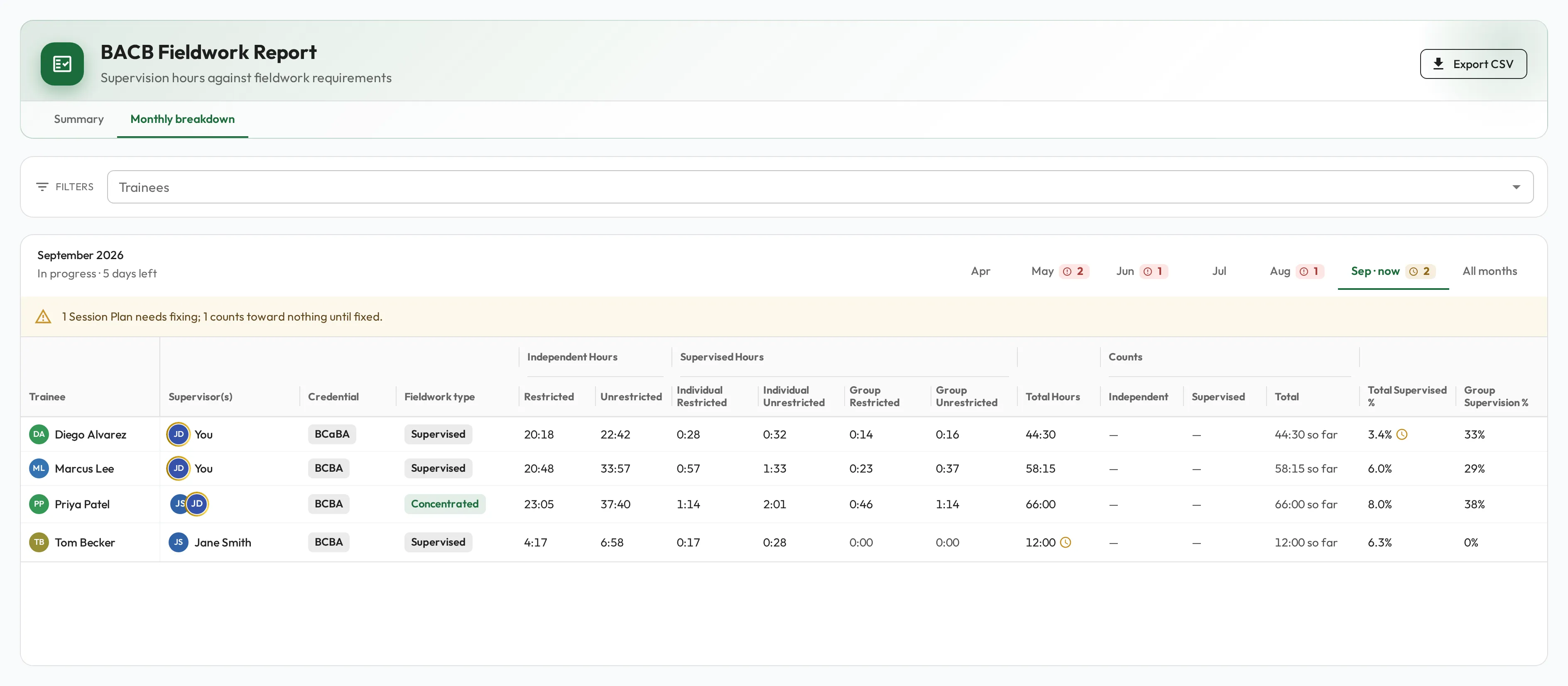
Each trainee has one row per month and fieldwork type. A month with both supervised and concentrated fieldwork has a row for each, checked on its own and marked Mixed fieldwork types.
Months
Section titled “Months”The tabs are the six months ending this month, the current one marked now, then All months. A tab carries its month’s worst state: trainees short, then trainees with requirements to go, then Session Plans to fix.
| Month | Reads | Gaps show as |
|---|---|---|
| The current month | In progress, with the days left | To go, a clock: there is still time |
| An earlier month | Closed · what the 2027 M-FVF records | Short: the month ended without it |
| All months | Every month, one row per trainee and month, with a Month column | As in each month |
Logging over 160 hours shows as Short at once, with the hours Over, since more time cannot fix it.
Requirements
Section titled “Requirements”Each month is checked against these, from BACB’s 2027 requirements.
| Requirement | BCBA supervised | BCBA concentrated | BCaBA supervised | BCaBA concentrated |
|---|---|---|---|---|
| Hours logged in the month | 20 to 160 | 20 to 160 | 20 to 160 | 20 to 160 |
| Supervised share of the month’s hours | at least 5% | at least 7.5% | at least 5% | at least 10% |
| Observing the trainee with a client | at least 60 min | at least 90 min | at least 60 min | at least 90 min |
| Group supervision | at most 50% of supervised hours | at most 50% | at most 50% | at most 50% |
Columns
Section titled “Columns”Hours read as hours and minutes, such as 146:30.
| Column | Shows |
|---|---|
| Trainee | The trainee, linked to their profile. |
| Month | Under All months only. |
| Supervisor(s) | Everyone who is the Supervisor on the row’s Session Plans. Two or more show as overlapping initials; hover over them to see the names. |
| Credential | BCBA or BCaBA. |
| Fieldwork type | Supervised or Concentrated. |
| Independent Hours: Restricted, Unrestricted | Hours with a Supervision Type of Independent. |
| Supervised Hours: Individual Restricted, Individual Unrestricted, Group Restricted, Group Unrestricted | Hours with a Supervision Type of Individual or Group. |
| Total Hours | Every hour logged, checked against 20 to 160. |
| Counts: Independent, Supervised, Total | What BACB counts after the month’s adjustments, as the M-FVF records it. In the current month only Total has a value, for example 58:15 so far. |
| Total Supervised % | The supervised share of Total Hours. |
| Group Supervision % | Group supervision’s share of the supervised hours. |
| Client Observation | Minutes observing the trainee with a client. |
| Supervision Contacts | Individual and Group Session Plans, except Recorded Video reviews. Not checked: BACB does not require contacts in 2027. |
| Documentation | Complete, or a button with how many Session Plans to fix. |
| Total Meetings | How many Session Plans the row holds. Select the number to open them in the Session Plans list. |
On a phone, Supervisor(s), Credential and Fieldwork type are hidden. Below a large screen, so are the six hour columns and Counts’ Independent and Supervised.
A symbol beside a value marks a gap: a clock for To go, a red exclamation mark for Short. Hover over or tap it to see the gap, what the requirement needs, and in a closed month what BACB’s adjustment does to the month.
How a closed month is adjusted
Section titled “How a closed month is adjusted”Once a month closes, Counts shows what the month’s verification form records after BACB’s adjustments. A month that meets every requirement counts in full, and a supervised month that also meets every concentrated requirement counts as concentrated fieldwork. Otherwise:
-
A concentrated month short of a concentrated requirement: it is checked again as supervised fieldwork, since concentrated hours cannot be adjusted.
-
Under 60 minutes of observation, or under 20 hours logged: none of the month counts.
-
Group hours above the individual hours: the extra group hours are removed.
-
Over 160 hours: independent hours above the cap are removed.
-
Under 5% supervised: independent hours are cut until the share is met.
-
Under 20 hours left after those cuts: none of the month counts.
Each cut removes restricted hours before unrestricted ones.
When this changes the month, a symbol beside the Total under Counts names the outcome:
| Symbol | Means |
|---|---|
| Adjusted | Some hours count, fewer than were logged. |
| Not counted | None of the month’s hours count. |
| Counted as supervised | A concentrated month counts in full, but as supervised fieldwork. |
| Counted as concentrated | A supervised month meets every concentrated requirement, so it counts as concentrated fieldwork. |
Documentation and Session Plans to fix
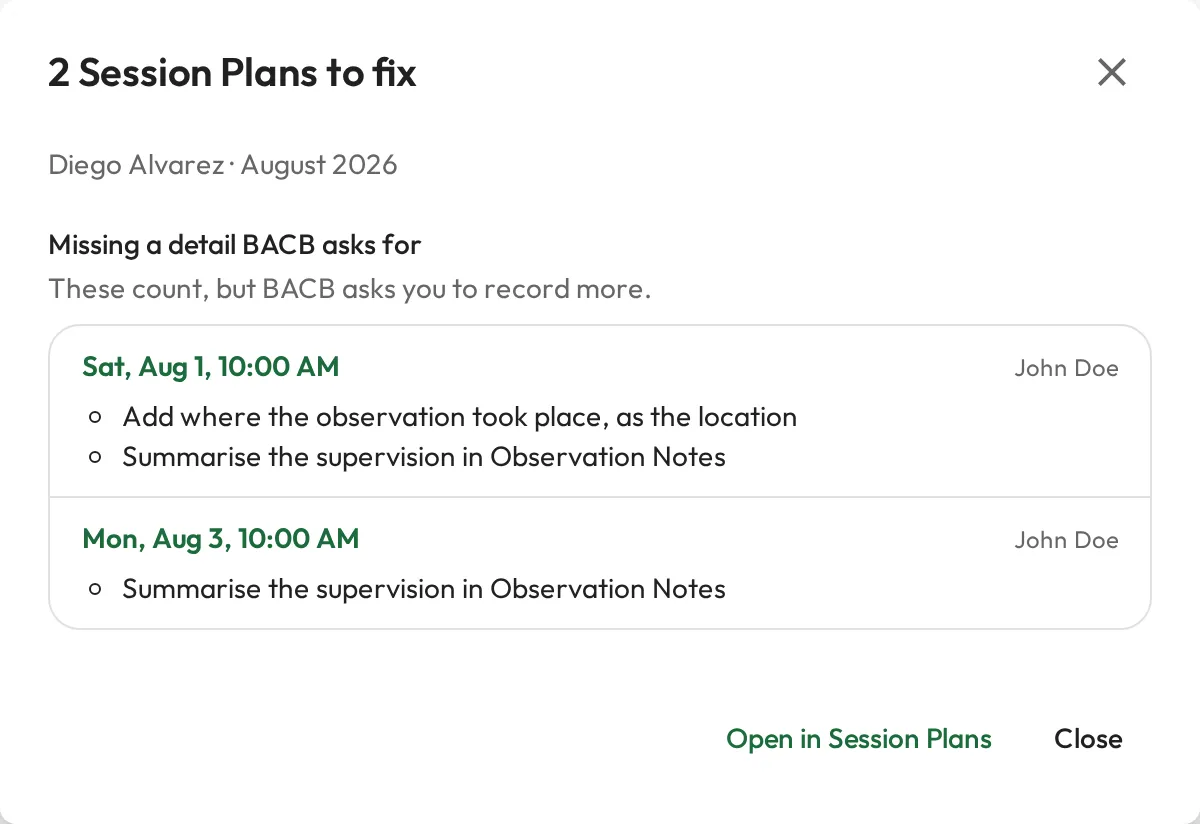
Section titled “Documentation and Session Plans to fix”The Documentation column reads Complete when every Session Plan in the row has what BACB asks for. Otherwise a button such as 2 to fix opens the list of Session Plans to fix, each linked, with what it misses:
- Count toward nothing: until fixed, these add no hours, contacts or observation. A Session Plan that has ended without being marked Done is here, with Mark it done, or cancel it if it did not happen.
- Missing a detail BACB asks for: these count, but BACB asks you to record more.
-
Select a Session Plan’s date to open it, or Open in Session Plans to list them all.
-
A Done Session Plan’s fields are locked. Select Review, then Re-open with its type, such as Re-open BACB Supervision. It goes back to Pending and, since it has ended, stays on the list, counting toward nothing, until it is completed again. Re-opening deletes any signatures, so they need signing again.
-
Fill in what it misses, such as Supervision Type or Activity Category under Custom fields on the Details tab. See What a Session Plan needs to count.
-
Complete it again, such as with Complete BACB Supervision. It now counts, and leaves the list of Session Plans to fix.
A banner above the grid sums up the tab’s Session Plans to fix. A Session Plan with no start date is in no month and has no row, so under All months the banner counts it and offers a button to open it.
Trainees and Export CSV
Section titled “Trainees and Export CSV”Trainees narrows the report to the people you pick. It offers only trainees the report checks, and shows only when there is more than one to offer. Left empty, the report covers every active person it checks.
Export CSV downloads the view that is open:
- Summary: one line per trainee, as BACB Fieldwork Summary. The file adds Since, Hours to go, More unrestricted needed, This month so far, and each fieldwork type’s independent and supervised hours as the F-FVF records them.
- Monthly breakdown: every row for those trainees, whatever month tab is open, as BACB Fieldwork Report. The file also has the Month and each supervisor’s Qualification and Certification ID, and writes a gap beside its value, such as (short 0:37).
Who can see it
Section titled “Who can see it”ABA & BACB Reports, with the BACB Fieldwork Report, the BACB Ongoing Supervision Report and BACB Records, shows for people whose type has Pursuing BACB Certification or Qualification. By default only Staff have these fields, so Clients and Guardians/Parents see neither the section nor the dashboard’s BACB shortcuts.
Each of the three shows only the people whose Session Plans you can read in full, and, with a predefined permission set, never refuses to open:
| Permission set | Shows |
|---|---|
| Admin | Everyone |
| Supervisor | Their Supervisees and themselves |
| Viewer | Their Viewees and themselves |
| Supervisee | Themselves |