

Skills overview
A skill is a specific, observable capability someone can develop, for example “Delivers SD clearly and concisely” or “Records ABC data as required.” Each skill defines how it’s assessed and what counts as mastery, so a BCBA in one clinic and a BCaBA in another score the same RBT the same way.
Skill: the unit of supervision
Section titled “Skill: the unit of supervision”Behaview treats the skill as the unit of supervision. Most of what a supervisor tracks comes back to skills: a role’s requirements are the skills an RBT or BCaBA must show, a supervision is where those skills are observed and scored, and a career plan is the path to the next set of skills. Anchoring on skills works because skills:
- Drive outcomes: how well a technician runs programs and takes data shapes treatment fidelity and client progress.
- Are in people’s control: unlike a client’s progress, a technician can practice a skill directly.
- Align everyone: RBTs, supervisors, and AI share one definition of what correct implementation looks like.
- Standardize and automate: because skills are defined consistently, AI can track them, coach on them, and handle the legwork.
So the things a supervisor already works with are views of the same underlying skills:
flowchart LR
  Skill(("Skill"))

  Skill -- "improves" --> Fidelity["Treatment fidelity"]
  Skill -- "makes up" --> Role["Role requirements"]
  Skill -- "is observed in" --> Supervision["Supervision Session Plans"]
  Skill -- "is the next step in a" --> Plan["Career plan"]
What makes up a skill
Section titled “What makes up a skill”- A Description of what the skill is and what correct performance looks like. This captures the what, not the how. Step-by-step protocols belong in a linked playbook page, so an assessment can point straight to the procedure for closing a gap.
- A Type: how you score it (see Assessment types).
- A Mastery Threshold: the score (1–100) to reach, and the number of Consecutive Sessions at or above it required to count as Proficient, both set under Options on the skill. Requiring more than one makes proficiency reflect consistency, not a single good session. Calculating mastery explains Proficient and Mastered.
Skill trees
Section titled “Skill trees”Skills can be organized hierarchically, with broader skills made up of narrower ones. A composite skill is not scored itself; its mastery comes from its children, so you can track both the whole capability and the specific behaviors underneath it.
Here is part of the “Behavior Technician Basics” skillset from the Skills Library:
| Level | Name | Assessment type |
|---|---|---|
| Skillset | Behavior Technician Basics | Composite |
| Section | A. Program Preparation | Composite |
| Task | ↳ 1. Prepares required materials prior to the beginning of session | Binary Prompt |
| Task | ↳ 3. Reads previous session notes | Binary Prompt |
| Section | C. Program Delivery | Composite |
| Task | ↳ 2. Delivers SD clearly and concisely | Multi-trial Binary Prompt |
| Task | ↳ 4. Provides the appropriate prompt level | Multi-trial Binary Prompt |
| Section | D. Data Collection | Composite |
| Task | ↳ 1. Records trial by trial data | Multi-trial Binary Prompt |
| Task | ↳ 5. Writes clear and concise session notes | Multi-trial Binary Prompt |
| Section | E. Professional Conduct | Composite |
| Task | ↳ 5. Arrives on time for sessions | Binary |
Each level plays a different role:
- Skillset is for organization. It groups the sections and isn’t scored directly; it counts as Proficient once every task beneath it is.
- Section groups related tasks and counts as Proficient once all of them are, so you can follow “Data Collection” as a whole.
- Task is what a supervisor observes and scores during a session.
Creating skills
Section titled “Creating skills”You can build skills three ways. We recommend them in this order:
- Import from the Skills Library and adjust: start from a ready-made ABA skillset and tailor it to your practice.
- Use AI over MCP: connect an AI tool and let it guide skill creation, for example turning your clinic’s own competency checklist into a skillset. It understands Behaview’s structure and asks the right questions.
- Create directly: once you’re comfortable with how skills are structured, define one by hand.
To grow a tree, open the skill you want to nest under and choose New Child Skill. On a Composite skill (a skillset or a section) it is the button next to Edit skill; on any other skill, it is in the dropdown beside AI Coach. The create page opens with that skill already set as the parent.
You can edit a skill’s description and settings at any time, and disable a skill that’s no longer relevant without losing its history.
The Skills Library
Section titled “The Skills Library”The Skills Library in the side menu holds ready-made ABA skillsets that you import and adapt. It lists each skillset as a card with a search box above; there are no categories to filter by. An ABA organization sees these skillsets:
| Skillset | What it covers |
|---|---|
| BCBA Test Content Outline (6th Edition) | The tasks on the BCBA exam blueprint, grouped into its sections A to I. |
| BCaBA Test Content Outline (6th Edition) | The tasks on the BCaBA exam blueprint, grouped into its sections A to I. |
| RBT Test Content Outline (3rd Edition) | The tasks on the RBT exam blueprint, grouped into its sections A to F. |
| RBT Competency Assessment (2026) | The tasks an RBT applicant demonstrates to an assessor, each scored by how it was shown (With a Client, Role-Play or Interview, where the task allows that method) or as Not Met. |
| Behavior Technician Basics | A starting set of everyday technician skills, from program preparation to professional conduct. |
BACB task lists describes each set and how to import it.
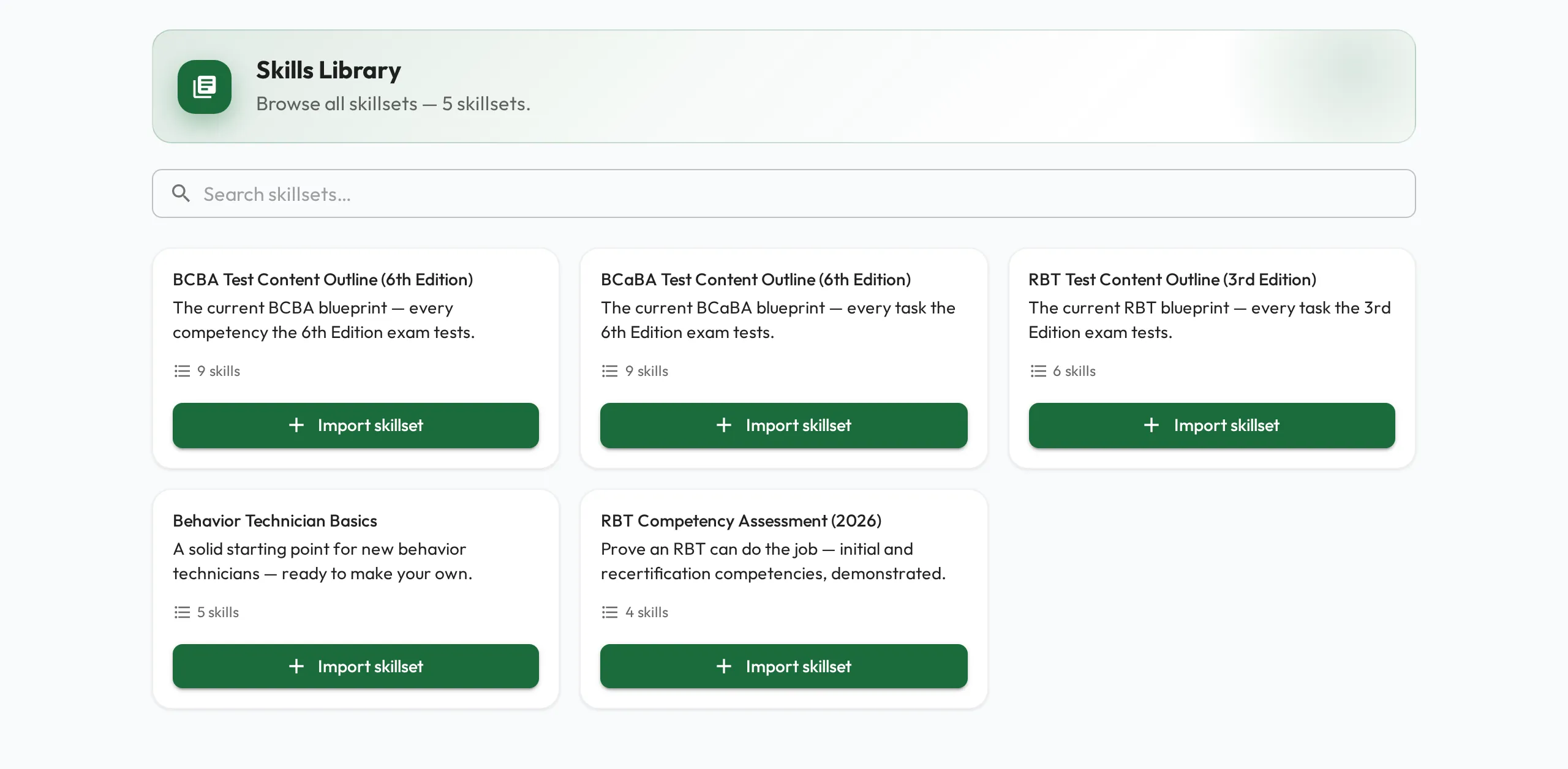
Choose Import skillset on a card to copy the whole skillset into your organization, every section and task included. Once imported, the card shows Imported, and the skills appear on your Skills page, where you can edit them like any other skill.